Even when entering sites manually into compatibility view from Tools -> Compatibility View Settings. The site you entered would not always be run in compatibility mode or it would tell you it was but it would lying straight to your face.
 Normally there would be a little compatibility icon in the address bar which you can click and choose to run a webpage in that mode. This button actually works here is how to get it back
goto Tools -> Compatibility View Settings
Now make sure that all the three checkboxes are UNTICKED
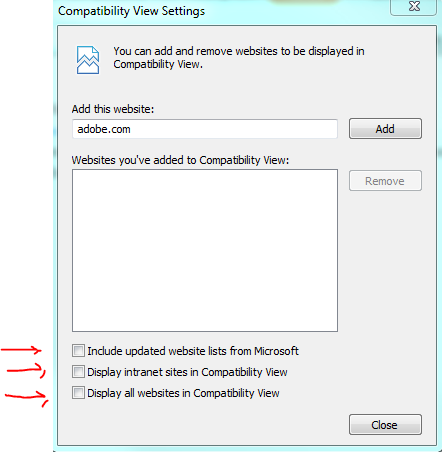
There you have it , the button shall return and you can run all the ancient websites you desire without error. Hope it helps someone as without this option you can have a heap of errors especially for sites running old versions of java , I shall do another post concerning that issue just so people can find the answer quicker.


